


3D Aquarium Live Wallpaper
4.61.18K Reviews
App Specs
- Version
- 5.37.5
- Updated On
- License
- Free
- Downloads
- 1,000,000+
- Developer
- Live Wallpapers by Wave Studio
- Categories
- Personalization
- Platform
- Android, iOS
Screenshots
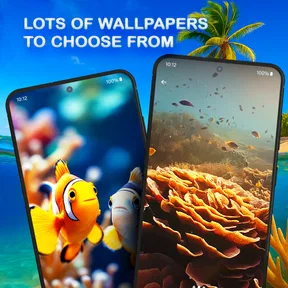
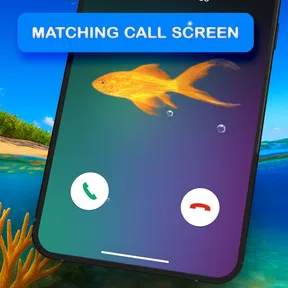
 Analysis by AppCompare
I tend to notice a phone’s wallpaper most when I’m waiting for something: standing in line, pausing between messages, or checking the time during a busy day. A moving aquarium can make those small moments feel less dull, and 3D Aquarium Live Wallpaper is built around that simple pleasure. I’d consider it for someone who wants a lively, peaceful-looking screen rather than another photo or a plain color.
It is a free personalization app from Live Wallpapers by Wave Studio, and the idea goes beyond a fish scene: the aquarium look is paired with a live keyboard. That combination matters in a shared household, where the home screen may be seen by everyone but the keyboard is experienced by whoever is typing. I’d treat the wallpaper as the main attraction and the keyboard as an extra to try, not assume both will suit every person who uses the phone.
One phone, several people, different tastes
On a family or shared device, a wallpaper is a small choice with a surprisingly public result. A child might enjoy the fish, while another person would rather keep the screen quiet and easy to read. The aquarium can make a phone feel more personal without requiring a collection of photos, but it is still a strong visual theme; anyone who dislikes motion or busy backgrounds may find it distracting rather than relaxing.
I’d make the decision with the regular users in mind before setting it as the default. If the phone belongs to one person but is often passed around, the animated display may be a fun conversation starter. If several people depend on the same home screen for quick access to calls, messages, or work apps, a calmer static background may be the more considerate choice. The wallpaper changes the visual atmosphere, not the way people share access or organize their accounts.
Choose the screen that benefits most
A useful way to approach customization is to separate the lock screen, home screen, and keyboard in your mind, even if the app presents them as parts of one aquarium theme. The home screen is where movement can be enjoyable during idle moments; the keyboard appears during focused tasks, when clarity and typing comfort matter more. I’d try the aquarium look in the place where it adds character without getting in the way, then decide whether I also want it while composing a message.
This is especially worth considering on a device used for school or work. A colorful background can be a pleasant personal touch, but a lot of icons, widgets, or text over a detailed scene may make the screen feel crowded. If your layout is already busy, simplify the visible icons or choose a less visually active arrangement before judging the wallpaper. That small adjustment can make the difference between a distinctive screen and one that feels difficult to scan.
A small household coordination habit
When a phone is shared, it helps to agree on who gets to change its appearance and when. I would set up the aquarium when the device is available, check that the usual shortcuts remain easy to find, and let other regular users try the keyboard before making it part of everyday typing. This is a simple courtesy rather than a special family feature: the app personalizes the display, while household rules still need to come from the people using the phone.
Worth Reading Before You Choose

EA SPORTS FC Mobile 26 Is a Bigger Football Game, but It Takes Time

Flipboard Shows What News Apps Must Do Beyond the Feed

Switching to Android Auto Means Rethinking Your Driving Routine

Google Calendar Makes a Crowded Week Easier to Manage

Ludo King Makes the Most of the Minutes Between Plans

Baby Panda World Brings Quick Play to Modern Phones, but Its Game Library Feels Busy
There is also a practical distinction between a shared phone and separate user accounts. A wallpaper setting may affect what other people see on the device, but it should not be treated as a way to keep one person’s preferences, messages, or activity private. If account boundaries matter, use the phone’s own account and access settings. The aquarium is decoration, not a substitute for device-level privacy choices.
Have you ever wanted to transform your phone into a serene underwater paradise? If you're nodding along, then 3D Aquarium Live Wallpaper might just be the app for you. As someone who loves a good visual escape, I decided to dive into this app and see if it lives up to the hype. Spoiler alert: it does, and then some.
Immersive Underwater Experience
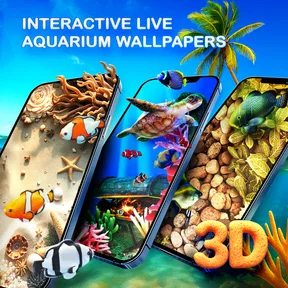
The first thing that caught my eye was the stunning 3D graphics. Once you install and open the app, you're greeted with beautifully animated fish swimming amidst vibrant corals and gentle seaweed swaying in the virtual current. It's like having a mini-aquarium right on your home screen. The realism is top-notch, making you feel like you're peering into an actual aquarium.
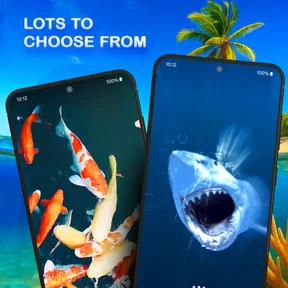
What really sets this app apart is the level of customization it offers. You can choose from a variety of fish species, each more colorful than the last. Whether you're a fan of the majestic angelfish or prefer the playful clownfish, there's something for everyone. And it's not just the fish; you can also adjust the lighting and background to suit your mood. Want a sunlit reef or a mysterious deep-sea vibe? The choice is yours.
Performance and Battery Impact
Now, I know what you're thinking: "Won't this drain my battery?" Surprisingly, the live wallpaper is optimized to be easy on your device. During my time using it, I noticed a minimal impact on battery life, which is a huge win. The developers have done a great job ensuring it runs smoothly without bogging down your phone.
Another aspect worth mentioning is its performance across different devices. Whether you're on an older phone or the latest model, the app adjusts the graphics quality accordingly, providing a seamless experience. No lagging or freezing here, just smooth swimming all the way.
Ease of Use
Setting up the wallpaper is super straightforward. Even if you're not tech-savvy, you'll find the interface intuitive and user-friendly. The app guides you through each step, from selecting your fish to setting the wallpaper. It’s as simple as tapping a few buttons, and voila, your phone is transformed.
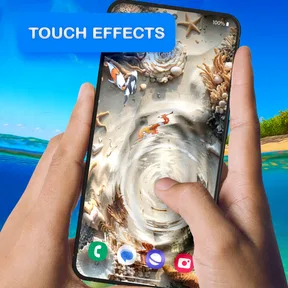
Plus, it’s not just a static wallpaper. You can interact with the fish! Tap on the screen, and watch them dart around. It’s a fun little feature that adds to the overall experience, especially if you need a quick stress-reliever during a hectic day.
Making the aquarium work in daily use
My favorite kind of use is not sitting and watching the screen for long stretches; it is noticing the scene in the gaps between tasks. Imagine checking your phone while waiting for a kettle to boil or taking a short pause after answering messages. The fish provide a brief visual break, and a tap can make the display feel responsive rather than like a picture that happens to move.
That same interaction is not always helpful. If you often tap the home screen to open apps quickly, you may prefer not to turn a short pause into a distraction. I’d keep the effect as a background detail and avoid treating it as something that needs constant attention. The best fit is someone who enjoys occasional animation, not someone looking for a game or a long-form aquarium simulator.
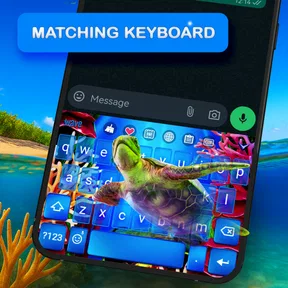
The keyboard deserves its own trial because it appears in a different, more functional context. Try it while writing a short, low-stakes message first, then see whether the visual style remains comfortable when you type for longer. If you write frequently, readability and familiar key placement should win over matching the wallpaper. You can enjoy the aquarium on the home screen and choose a simpler keyboard if that is the better balance for your hands and eyes.
Compared with ordinary wallpaper choices
A still photograph is usually the better choice if you want a favorite image, a clean background, or the least visually active screen. A plain color is even easier to scan when icons and widgets already fill the display. This app makes more sense when the point is motion and atmosphere: fish, coral, and the underwater setting give it a clear identity that a generic animated pattern does not have.
Compared with other live wallpapers, the notable distinction is the aquarium theme together with a matching keyboard option. That makes the experience more cohesive for someone who wants the same visual idea across different parts of the phone. The trade-off is that a themed keyboard may not be everyone’s preference, and anyone seeking a broad set of unrelated backgrounds may be better served by a general wallpaper collection. I would choose this for its particular underwater mood, not as an all-purpose customization toolkit.
There is a useful setup trade-off here: more detail can make the scene feel richer, but a simpler background may leave app icons easier to recognize. I would test the wallpaper with the actual home-screen layout rather than judging it only in a preview. If icons disappear into bright coral or the screen looks crowded, changing the background or rearranging a few shortcuts is more sensible than insisting on the most elaborate look.
Who should try it—and who may prefer something else
I can see this working well for people who like marine imagery, enjoy changing their phone’s appearance, or want a soft visual accent for idle moments. It also suits someone looking for a light personal touch on a device that otherwise feels plain. The app is free, has an Everyone content rating, and has attracted over a million installs; its average rating is 4.7 from around 77,000 ratings, which gives a prospective user a sense of its broad appeal without telling you whether the motion or keyboard will suit your own habits.
I would skip it if you prefer static screens, find animation distracting, or need every part of the display to stay visually minimal. It may also be a poor match for a shared device when the regular users cannot agree on a prominent theme. In that case, a neutral wallpaper is the easier compromise, and there is no reason to adopt the keyboard styling just because it is available alongside the aquarium.
For younger users, the Everyone rating makes the app suitable for a broad audience, but I’d still treat a phone’s overall setup as an adult’s or household’s responsibility where appropriate. A content rating is not a promise that every screen style will suit every child, nor does a decorative app set rules for screen time or shared access. I’d show the wallpaper to the child, check that the keyboard remains comfortable for the person who types, and keep account and device boundaries managed through the phone itself.
One more practical question is whether it makes sense to leave a live scene running all the time. My experience with a live wallpaper is that the visual payoff is greatest when the screen is actually being checked, not when the phone is sitting unused. If battery life is a priority, compare your own use over an ordinary day and switch back to a still background if you notice an unwanted difference. A device’s screen settings and usage habits can matter as much as the wallpaper itself, so I would not assume everyone will see the same result.
The app’s current version is 5.31.4, and it runs on Android 7.0 or later. That makes the compatibility check straightforward for Android owners: confirm the operating system before installing, especially on an older or hand-me-down phone. The app was released on February 12, 2024, and is developed by Live Wallpapers by Wave Studio. Those details are useful context, but my recommendation still comes down to whether you want an animated aquarium and are happy to make room for it in your everyday screen layout.
Why You’ll Keep Coming Back
So, why should you choose this aquarium theme over other live wallpapers? For me, it’s the combination of visual appeal, customization, and performance. It’s not just a pretty backdrop; it’s a dynamic, interactive experience that brings a slice of the ocean to your smartphone.
Whether you’re a marine biology enthusiast or someone who simply appreciates beautiful visuals, this app caters to a wide audience. The regular updates and new content keep it fresh, ensuring you never get bored of looking at the same scene.
In a world where we’re constantly glued to our screens, having something calming and beautiful to look at is a welcome change. The underwater wallpaper does just that, offering a peaceful escape with every glance at your phone.
To sum it up, if you’re on the hunt for a live wallpaper that’s both stunning and efficient, look no further. Dive into the underwater world of 3D Aquarium Live Wallpaper and let the tranquility wash over you. Trust me, it’s worth a look—and a download.
Pros
- Stunning 3D graphics enhance visual appeal.
- Customizable fish and environments.
- Smooth performance with minimal battery drain.
- Interactive touch features for user engagement.
- Regular updates with new content.
Cons
- Limited free content; in-app purchases needed.
- Some devices may experience occasional lag.
- Ads can disrupt the immersive experience.
- Customization options can be overwhelming.
- Not compatible with all older devices.
FAQs for 3D Aquarium Live Wallpaper
What features does the 3D Aquarium Live Wallpaper offer?
The 3D Aquarium Live Wallpaper provides a realistic underwater experience with high-definition graphics and fluid animations. Users can customize their aquarium with various fish species, coral reefs, and lighting effects. The app also offers interactive elements, allowing users to tap the screen and see fish react, adding to the immersive experience.
Will the 3D Aquarium Live Wallpaper drain my device's battery?
Live wallpapers, including the 3D Aquarium, can consume more battery than static wallpapers due to their graphical and interactive nature. However, the app is optimized to minimize battery drain by using efficient coding and providing settings to adjust performance and quality, ensuring a balance between visual appeal and battery life.
Is the 3D Aquarium Live Wallpaper compatible with all devices?
The 3D Aquarium Live Wallpaper is designed for both Android and iOS platforms, but compatibility may vary based on the device's model and operating system version. It is recommended to check the app's requirements on the download page to ensure your device can support its features for optimal performance.
Can I customize the fish and environment in the 3D Aquarium Live Wallpaper?
Yes, customization is a key feature of the 3D Aquarium Live Wallpaper. Users can choose from a variety of fish species and aquatic plants, adjust lighting and color schemes, and even change the background scenery. These options allow for a personalized and unique underwater environment tailored to individual preferences.
Is there a cost associated with the 3D Aquarium Live Wallpaper?
The 3D Aquarium Live Wallpaper typically offers a free version with basic features. However, to access additional customization options and premium content, users may need to make in-app purchases. It's advisable to review the app's pricing details on the download page to determine which features are included for free and which require payment.


